If you have ever asked ChatGPT to recommend a plumber, a dentist, or a web designer in your city, you have already seen the future of how customers find you. Here is what most San Diego owners have not realized yet: you can now step in and control what ChatGPT says about your own business. OpenAI has quietly opened a Business Hub where you claim your listing, correct the facts, and see how often the AI is putting you in front of people. It is brand new, your competitors almost certainly have not touched it, and this guide walks you through claiming yours.
What a ChatGPT business listing actually is
Think of it like your Google Business Profile, but for AI answers. When someone asks ChatGPT about businesses like yours, it pulls from what it knows about the web to give an answer. The Business Hub is where you, the owner, step in and make sure the facts it uses are correct: your website, your description, your category, your policies, your logo.
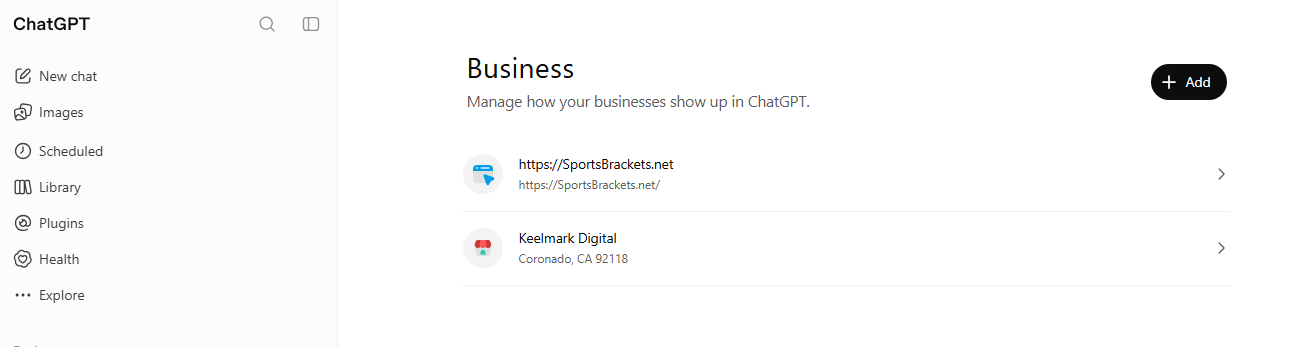
Claiming your listing gives you three things that matter. First, accuracy: you control the description, category, hours, contact details, and policies ChatGPT references, instead of leaving it to guess from scattered data. Second, insights: you get a 28-day view of how often your business is mentioned, how many people clicked through to your website, and what topics people are asking about when you come up. That is real visibility data you cannot get any other way. Third, a head start: because this is so new, being claimed and accurate now means you are shaping how AI talks about your business in your area before the rest of your market shows up.
One honest note, because we believe in setting real expectations: claiming your listing does not buy you higher placement or guarantee more sales, and there is no way to pay ChatGPT to recommend you over a competitor. What it does is make sure that when ChatGPT talks about you, it gets you right. Accuracy first, and visibility follows.
How to claim your business on ChatGPT, step by step
The actual work takes a few minutes, plus some waiting on OpenAI’s review. Here is the path.
- Go to the Business Hub. Head to chatgpt.com/business-hub and sign in with the account you want to manage the business from. If you received an invitation email, sign in with the exact address that got it.
- Find your listing. Search for your business by name. Local businesses and restaurants can claim an existing US listing. If yours shows as locked, you will see a Contact support option instead of the verification step.
- Verify that you control the business. ChatGPT offers a few ways to prove it is you, and you will not always see all of them: a code to the business phone, a code to the email already on the listing (not one you pick), a TXT record you add to your website’s DNS, or a Shopify login for online stores.
- Wait for OpenAI’s review. After you submit, OpenAI reviews the claim and emails a decision or a request for more information. They do not publish a set turnaround, so give it a little patience.
- Complete the identity check. This step unlocks most of the good features and is handled through a verification partner called Persona. Have your government-issued ID ready, along with your business registration information such as your EIN, and proof that you are authorized to represent the business.
- Fill in your business information. Add or correct your website, description, category, logo, cover photo, and policies. Make them match your Google Business Profile exactly, because consistency across the web builds trust in every system. One heads-up: once approved, your profile publishes automatically, so get the details right before you submit.
- Add products, if you sell online. Ecommerce businesses can upload a product feed or point to a hosted feed URL. A service business can skip this and leave it empty.
A few traps to avoid
A handful of small things trip people up. The verification email goes to the address already on your listing, not one you choose, so make sure you can get into it. The identity check is a separate, more involved step than the initial claim, so set aside a few minutes with your ID and business documents in hand. And because your profile goes live automatically after approval, treat the information you enter as final, not a rough draft.
Why doing this now is the smart move
Every few years something shifts in how customers find local businesses. The phone book gave way to Google. Google gave way, in part, to maps and reviews. AI answers are the next shift, and it is happening faster than the last ones did. The owners who claim their space early, while the tools are new and the field is empty, are the ones who look established when everyone else finally arrives.
For a San Diego small business, that edge is very real right now. Most of your local competitors do not know this exists yet. Claiming your ChatGPT listing, keeping it accurate, and pairing it with a strong Google Business Profile is one of the cleanest ways to stay visible as search keeps changing. For the bigger picture on this, see our guide on how small businesses show up in ChatGPT and Google’s AI answers.
We will handle it for you
If reading “DNS TXT record” and “identity verification through Persona” made you want to close the tab, that is exactly the kind of thing we take off your plate. Keelmark Digital is a veteran-owned, Coronado-based studio that helps San Diego County small businesses get found, and getting you set up and accurate on ChatGPT is part of the local visibility work we do every day. We will claim your listing, pass the verification, write a description that actually sounds like your business, and keep it consistent with your Google profile.
If you would rather stay ahead of where search is going without wrestling the setup yourself, call us at (619) 436-4091 or reach out through keelmarkdigital.com. We will get you claimed and visible.
