Category: Insights

  • Does My Business Need GEO? A Plain-English Checklist

    Does My Business Need GEO? A Plain-English Checklist

    Short answer: if your customers find you by searching, the answer is probably yes. The good news is that for most small businesses, GEO is not a big new project. It is a handful of additions on top of the local SEO you should be doing anyway. This page will help you decide whether it matters for your business right now, or whether it can wait.

    If you are new to the term, Generative Engine Optimization (GEO) means making your business easy for AI tools like ChatGPT, Google AI Overviews, Gemini, and Perplexity to find, trust, and recommend. Our plain-English guide to GEO covers the full picture. This page is the quick decision version.

    You probably need GEO if…

    Small storefront recommended by an AI assistant on a smartphone, illustrating GEO for small business
    • Customers compare options before they call. Contractors, dentists, lawyers, IT providers, and anyone with a bigger-ticket service. These are exactly the questions people now type into an AI assistant: “Who is a good roofer in Oceanside?”
    • You sell to other businesses. B2B buyers use AI tools heavily for research and shortlists. If you are not in the answer, you are not on the list.
    • Your competitors show up in AI answers and you do not. The five-minute test below will tell you.
    • Your business information is inconsistent online. Different phone numbers, old addresses, or a stale Yelp page confuse AI tools the same way they confuse Google.
    • Your website says little about what you actually do. AI tools can only recommend what they can read. Thin pages with no services, prices, or service areas give them nothing to work with.

    GEO can wait if…

    • Your Google Business Profile is not claimed or verified yet. Do that first. It feeds Google’s AI answers directly, and nothing else on this list matters as much.
    • You do not have a working website. Get a fast, clear site live before worrying about AI. Start with how to start a business website.
    • Nearly all your work comes from referrals and repeat customers, and you are already at capacity. GEO is about being found by new customers. If you cannot take more, it can sit for now.

    A five-minute test: ask the AI yourself

    Before you spend anything, check where you stand. Open ChatGPT, Gemini, and Google (look at the AI Overview at the top), and ask each one the questions your customers would ask:

    1. “Who is the best [your service] in [your city]?”
    2. “I need [your service] near [a neighborhood you serve]. Who should I call?”
    3. “What do you know about [your business name]?”

    If you show up with accurate details, you are in good shape and GEO is maintenance. If competitors show up and you do not, or the AI gets your hours, phone, or services wrong, that is your sign to act. Write down what each tool says so you can compare in a couple of months.

    What GEO actually involves for a small business

    Here is the part most agencies will not tell you: Google itself says there are no special requirements or tricks needed to appear in AI Overviews or AI Mode. Your pages need to be indexed, easy to crawl, and clearly written. In practice, GEO for a small business comes down to a short list:

    • Consistent business information everywhere. Same name, address, phone, and hours on your site, Google, Bing, Apple, Yelp, and the major directories. See why business info consistency matters.
    • Clear service pages written in plain text. What you do, where you do it, what it costs or how pricing works, and answers to the questions customers actually ask.
    • Reviews that describe the work. AI tools read reviews. A review that says “fixed our leaking roof in Vista the same week” helps more than “great service.” Our tips on getting more Google reviews apply here too.
    • Claiming the listings AI tools use. Bing powers much of ChatGPT search, and ChatGPT now lets you claim your business directly.
    • Not blocking the AI crawlers. A surprising number of sites block them by accident through hosting or security settings.

    Notice that almost all of that is also good local SEO. That is why we treat them as one job. Our article on how GEO and local SEO work together goes deeper.

    What does GEO cost?

    It depends on how much is broken. If your listings are already consistent and your site is solid, the work is mostly a few hours of cleanup you can do yourself using the list above. If things are scattered, a one-time fix usually covers it. Our Local Visibility Tune-Up is a flat $299 and handles the biggest gaps for both Google and AI search. Ongoing monthly work only makes sense if you are in a competitive market or adding new services and locations.

    Be wary of anyone selling GEO as an expensive, mysterious new service with special files or secret formulas. Google’s own guidance says you do not need them.

    Quick answers

    Is GEO replacing SEO?

    No. AI tools lean on the same signals search engines do: indexed pages, clear content, consistent business details, and reviews. GEO is SEO with a few extra checks for how AI tools read and cite you.

    How long until I show up in AI answers?

    Fixes to listings and your Google Business Profile can show up within weeks. Content and reviews build over a few months. Rerun the five-minute test every month or two to track it.

    Is GEO worth it for a very small business?

    For most local service businesses, yes, because the basic version is cheap and overlaps with work that already brings in customers from Google. The expensive version is rarely needed.

    Not sure where you stand?

    We will run the AI and local search check for you and tell you plainly whether GEO is worth your time right now. Get a free analysis. Keelmark Digital is a veteran-owned web studio based in Coronado, serving small businesses across San Diego County.


  • How Local Businesses Show Up in AI Search (GEO + Local SEO)

    How Local Businesses Show Up in AI Search (GEO + Local SEO)

    Ask ChatGPT or Google’s AI “who is the best plumber near me?” or “find me a web designer in San Diego,” and you will get a short list of actual businesses, by name, often before you scroll a single search result. For a local business, being one of those names is the whole game now. This is where Generative Engine Optimization (GEO) meets local SEO, and the good news is that the two run on the same engine.

    How AI answers a local question

    An AI map pin highlighting a local business in AI search results

    When someone asks an AI for the best local option, the AI is not pulling from thin air. It assembles an answer from the same trusted sources that already decide the Google Map Pack: your Google Business Profile, your reviews, the directories and citations that list you, and the local content on your website. If those sources are complete, consistent, and positive, the AI feels safe naming you. If they are thin or contradictory, it names someone it is more sure about.

    In other words, the work that gets you into the local 3-pack is largely the same work that gets you into the AI’s answer. Our guide to the Google Map Pack and local 3-pack covers that side in full.

    GEO and the Map Pack share the same trust signals

    Both AI answers and the Map Pack reward the same handful of things.

    A complete, accurate Google Business Profile. This is the anchor. Category, service area, hours, services, and photos all feed both the map pack and what the AI knows about you. See our take on Google Business Profile.

    Consistent business information everywhere. Your name, phone, and service area described the same way across your site, your profile, and every directory. Conflicting information makes both Google and the AI unsure, and unsure means left out.

    Real reviews. Reviews prove you are legitimate and give the AI the actual language to describe you. They are a top signal for both the map pack and AI recommendations.

    Local citations. Being listed consistently across the directories that matter builds the web-wide agreement that you exist and serve your area.

    Genuinely local content. Pages that clearly state the towns and neighborhoods you serve help both Google and the AI connect you to near-me questions.

    What to do to show up in local AI search

    1. Fully complete and verify your Google Business Profile. Right category, accurate service area, services listed, hours, and real photos. This single step feeds both the map pack and AI answers more than anything else.

    2. Make your business information identical everywhere. Pick one exact version of your name, phone, and service area, and use it on your website, your profile, and every directory. Fix the conflicts first, then expand your listings.

    3. Earn and respond to reviews. Ask happy customers, make it easy, and reply to the ones you get. Volume and recency both matter, and the words customers use become the words the AI uses.

    4. Build consistent local citations. Get listed in the general and industry directories that serve your area. Consistency matters more than volume.

    5. Create clear local content. Pages and posts that name the areas you serve and answer the questions local customers actually ask. Question-shaped content is easiest for an AI to lift into an answer.

    6. Keep everything current. Updated hours, fresh posts, recent reviews, and accurate information all tell both Google and the AI that your listing can be trusted today.

    A quick local example

    Say you run a service business in the San Diego area. When someone nearby asks an AI “who should I hire for this near me?”, the AI looks for a business with a complete San Diego profile, consistent information across the web, strong recent reviews, and clear content tying it to the local area, whether that is Chula Vista, Coronado, or anywhere else you serve. Line those up and you are the name it gives back. The businesses winning these answers are not the biggest; they are the most consistent and the most trusted. This is the local side of Generative Engine Optimization.

    Frequently asked questions

    How do I get my business recommended by AI for local searches?

    Complete and verify your Google Business Profile, keep your name, phone, and service area identical everywhere, earn real reviews, build consistent local citations, and publish clear content about the areas you serve. These are the same signals that power the Google Map Pack.

    Is local GEO different from local SEO?

    They overlap almost entirely. Local SEO gets you into the Map Pack; local GEO gets you named in the AI’s answer. Both run on your Google Business Profile, reviews, citations, and consistent business information.

    Do reviews help with AI search?

    Yes. Reviews are both a trust signal and a source of the language the AI uses to describe you, which makes them one of the most valuable things you can work on.

    Want to see whether AI and the map pack already surface your business locally, and where the gaps are? We will take a look, for free, no pressure. Start here, or learn more about our local SEO work.

  • Why Your Business Info Doesn’t Match Across the Web (and Why Google Cares)

    Why Your Business Info Doesn’t Match Across the Web (and Why Google Cares)

    Pull up your business on Google, then check your Yelp page, your Facebook, and that old directory listing you forgot you had. There is a good chance something does not line up. The phone number on one is your cell, the other is a landline. One says “Suite B,” another says “Ste. B,” and a third drops the suite entirely. An old address from before you moved is still floating around out there.

    It feels like a nitpick. It is not, at least not to Google. Those small mismatches are quietly working against how often you show up when a local customer searches for what you do. Here is what is actually happening, and how to clean it up.

    Your name, address, and phone are a trust signal

    In local search, your business name, address, and phone number get shortened to three letters: NAP. Google treats your NAP as a kind of fingerprint. Every time your business is mentioned somewhere online, on a directory, a review site, a chamber page, Google notices and cross-checks it against everything else it knows about you.

    When those mentions all agree, Google gets more confident that your business is real, established, and exactly where you say it is. When they conflict, that confidence drops. And in local search, confidence is close to currency. The businesses Google trusts most are the ones it is most comfortable showing in the map pack, that row of three local results that sits at the top of the page and gets the lion’s share of the clicks.

    Google is fairly direct about this. In its own guidance on improving your local ranking, it notes that businesses with complete and accurate information are more likely to show up in local search, and that inaccurate information can keep your profile from appearing for relevant searches at all. Scattered, conflicting details are the opposite of the accuracy Google is asking for.

    So a pile of mismatched listings does not just look sloppy. It makes Google less sure of you, and a less sure Google ranks you lower.

    How the mismatches happen in the first place

    A San Diego storefront at golden hour with an Open sign and posted hours in the window

    Almost nobody creates this mess on purpose. It builds up on its own.

    You moved offices, and half your listings never got the memo. You switched from a tracking number back to your real line. You started going by a slightly shorter business name. A directory you have never heard of auto-generated a listing for you by scraping old data, and got it half right. Big data aggregators, the companies that quietly feed business information to dozens of sites at once, picked up a stale version of your details years ago and have been spreading it ever since.

    Even formatting counts. “Street” versus “St,” “Suite” versus “Ste,” a phone number written with dashes on one site and parentheses on another. Google is good at sorting these out, but every inconsistency is one more small reason for it to hesitate, and they add up.

    What consistency actually looks like

    Fixing this starts with a decision, not a tool. You pick one official version of your business information and treat it as the single source of truth. One exact spelling of your name. One address, formatted the same way every time. One phone number. One website.

    Then that exact version goes everywhere. Not “close enough,” but character for character the same. If your canonical address uses “Ste 200,” then every listing uses “Ste 200,” not “Suite 200” on some and “#200” on others. It sounds fussy because it is, but this is precisely the kind of thing Google is checking.

    If you want a head start, we keep a simple rule for our own clients: write your official NAP down once, keep it somewhere you can copy and paste from, and never type it from memory again.

    How to clean it up, in order

    You do not have to fix everything in one afternoon. Work top down, because not all listings carry the same weight.

    Start with the heavy hitters. Your Google Business Profile comes first, since it powers the map pack directly. Then Bing Places, Apple Business Connect, Yelp, and your Facebook page. These five shape most of what customers and search engines see, so getting them perfectly aligned does the most good.

    Next, handle the aggregators. A few large data providers feed business info to much of the rest of the web. Correct your details with them and you fix a whole downstream chain of listings you would otherwise have to chase one by one.

    Then work through the major directories, and hunt down the stragglers: duplicate listings, old addresses, pages created back when you had a different number. Duplicates are especially worth killing off, because a second listing for the same business splits your signals and confuses everyone, Google included.

    Finally, keep it that way. The real win is not a one-time cleanup, it is a habit. Any time something changes, your phone, your suite, your hours, you update it everywhere at once, starting from that single source of truth.

    Where the payoff shows up

    Clean, consistent information does two jobs at the same time. It tells Google your business is trustworthy and exactly where it claims to be, which helps you surface in local results and the map pack. And it makes sure that when a real person finds you, they reach the right number and drive to the right address instead of a location you left two years ago.

    None of this is flashy. There is no single switch that doubles your traffic. But consistency is one of the quiet foundations that everything else in local SEO is built on, right alongside a complete profile and a steady flow of customer reviews. Get the foundation right and the rest of your effort works harder.

    If you would rather not spend your weekends auditing directory listings, that is exactly the sort of unglamorous, important work we handle for San Diego small businesses. Tell us about your business and we will map out the right path.

    Frequently asked questions

    What does NAP consistency mean?

    NAP stands for name, address, and phone number. NAP consistency means those three details appear exactly the same way everywhere your business is listed online, down to the formatting. It is one of the signals Google uses to decide how much to trust and rank a local business.

    Does my address really have to match exactly?

    As closely as you can manage, yes. Google can usually tell that “Suite 200” and “Ste 200” are the same place, but every inconsistency is a small point of friction. Picking one format and using it everywhere removes the guesswork and strengthens the signal.

    How do I find listings with the wrong information?

    Start by searching your business name, your phone number, and your old address or phone if you have changed them, and see what comes up. The listings that matter most are the ones people actually use: Google, Bing, Apple, Yelp, Facebook, and the big data aggregators. A listing-management tool or a local SEO partner can scan for the rest.

    How long until fixing this helps my ranking?

    It is gradual, not instant. Some listings update within days, aggregator-fed ones can take a few weeks, and Google re-evaluates trust over time rather than overnight. Consistency is a long-game signal, which is exactly why it is worth setting up correctly once.

    Related reading: consistent business information is also the foundation of Generative Engine Optimization (GEO).

  • How to Claim Your Business on ChatGPT: A Step-by-Step Guide for San Diego Owners

    How to Claim Your Business on ChatGPT: A Step-by-Step Guide for San Diego Owners

    If you have ever asked ChatGPT to recommend a plumber, a dentist, or a web designer in your city, you have already seen the future of how customers find you. Here is what most San Diego owners have not realized yet: you can now step in and control what ChatGPT says about your own business. OpenAI has quietly opened a Business Hub where you claim your listing, correct the facts, and see how often the AI is putting you in front of people. It is brand new, your competitors almost certainly have not touched it, and this guide walks you through claiming yours.

    What a ChatGPT business listing actually is

    Think of it like your Google Business Profile, but for AI answers. When someone asks ChatGPT about businesses like yours, it pulls from what it knows about the web to give an answer. The Business Hub is where you, the owner, step in and make sure the facts it uses are correct: your website, your description, your category, your policies, your logo.

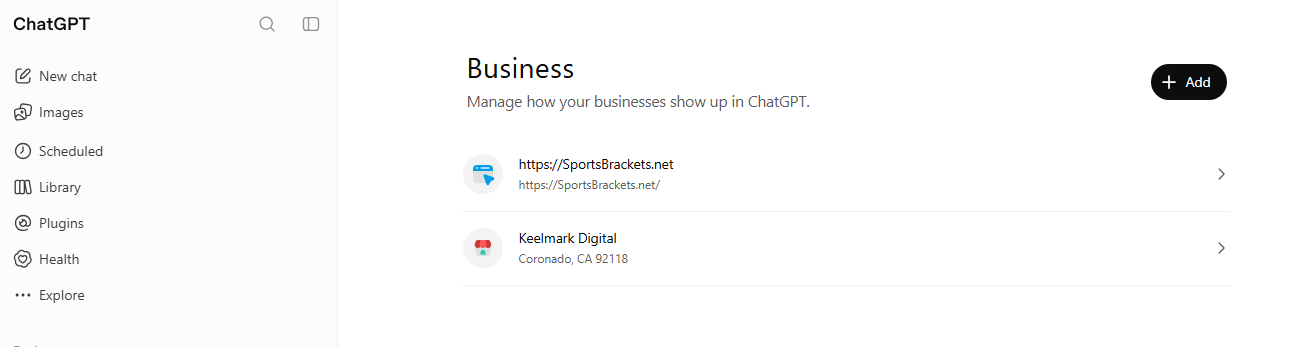
    ChatGPT Business Hub showing Keelmark Digital and SportsBrackets claimed listings
    Our own ChatGPT Business Hub, with Keelmark and SportsBrackets both claimed. We set these up ourselves before writing this guide.

    Claiming your listing gives you three things that matter. First, accuracy: you control the description, category, hours, contact details, and policies ChatGPT references, instead of leaving it to guess from scattered data. Second, insights: you get a 28-day view of how often your business is mentioned, how many people clicked through to your website, and what topics people are asking about when you come up. That is real visibility data you cannot get any other way. Third, a head start: because this is so new, being claimed and accurate now means you are shaping how AI talks about your business in your area before the rest of your market shows up.

    One honest note, because we believe in setting real expectations: claiming your listing does not buy you higher placement or guarantee more sales, and there is no way to pay ChatGPT to recommend you over a competitor. What it does is make sure that when ChatGPT talks about you, it gets you right. Accuracy first, and visibility follows.

    How to claim your business on ChatGPT, step by step

    The actual work takes a few minutes, plus some waiting on OpenAI’s review. Here is the path.

    1. Go to the Business Hub. Head to chatgpt.com/business-hub and sign in with the account you want to manage the business from. If you received an invitation email, sign in with the exact address that got it.
    2. Find your listing. Search for your business by name. Local businesses and restaurants can claim an existing US listing. If yours shows as locked, you will see a Contact support option instead of the verification step.
    3. Verify that you control the business. ChatGPT offers a few ways to prove it is you, and you will not always see all of them: a code to the business phone, a code to the email already on the listing (not one you pick), a TXT record you add to your website’s DNS, or a Shopify login for online stores.
    4. Wait for OpenAI’s review. After you submit, OpenAI reviews the claim and emails a decision or a request for more information. They do not publish a set turnaround, so give it a little patience.
    5. Complete the identity check. This step unlocks most of the good features and is handled through a verification partner called Persona. Have your government-issued ID ready, along with your business registration information such as your EIN, and proof that you are authorized to represent the business.
    6. Fill in your business information. Add or correct your website, description, category, logo, cover photo, and policies. Make them match your Google Business Profile exactly, because consistency across the web builds trust in every system. One heads-up: once approved, your profile publishes automatically, so get the details right before you submit.
    7. Add products, if you sell online. Ecommerce businesses can upload a product feed or point to a hosted feed URL. A service business can skip this and leave it empty.

    A few traps to avoid

    A handful of small things trip people up. The verification email goes to the address already on your listing, not one you choose, so make sure you can get into it. The identity check is a separate, more involved step than the initial claim, so set aside a few minutes with your ID and business documents in hand. And because your profile goes live automatically after approval, treat the information you enter as final, not a rough draft.

    Why doing this now is the smart move

    Every few years something shifts in how customers find local businesses. The phone book gave way to Google. Google gave way, in part, to maps and reviews. AI answers are the next shift, and it is happening faster than the last ones did. The owners who claim their space early, while the tools are new and the field is empty, are the ones who look established when everyone else finally arrives.

    For a San Diego small business, that edge is very real right now. Most of your local competitors do not know this exists yet. Claiming your ChatGPT listing, keeping it accurate, and pairing it with a strong Google Business Profile is one of the cleanest ways to stay visible as search keeps changing. For the bigger picture on this, see our guide on how small businesses show up in ChatGPT and Google’s AI answers.

    We will handle it for you

    If reading “DNS TXT record” and “identity verification through Persona” made you want to close the tab, that is exactly the kind of thing we take off your plate. Keelmark Digital is a veteran-owned, Coronado-based studio that helps San Diego County small businesses get found, and getting you set up and accurate on ChatGPT is part of the local visibility work we do every day. We will claim your listing, pass the verification, write a description that actually sounds like your business, and keep it consistent with your Google profile.

    If you would rather stay ahead of where search is going without wrestling the setup yourself, call us at (619) 436-4091 or reach out through keelmarkdigital.com. We will get you claimed and visible.

  • How Small Businesses Show Up in ChatGPT and Google’s AI Answers

    How Small Businesses Show Up in ChatGPT and Google’s AI Answers

    More and more, people do not scroll a list of ten blue links anymore. They ask a question and read the answer. They type “best commercial cleaner near me” into Google and get an AI summary at the top. They ask ChatGPT “who should I call to redo my restaurant’s website in Coronado” and get a short list of names. The search box is quietly turning into an answer box, and that changes one thing for every small business: you are no longer trying to rank on a page, you are trying to be the answer.

    The good news is that there is no secret trick to it, and you do not pay to be included. Showing up in AI answers runs on the same foundations as showing up in local search, done properly. If you have those in place, the AI tools tend to find you and recommend you. If you do not, they skip you, and you never see it happen.

    What is actually changing

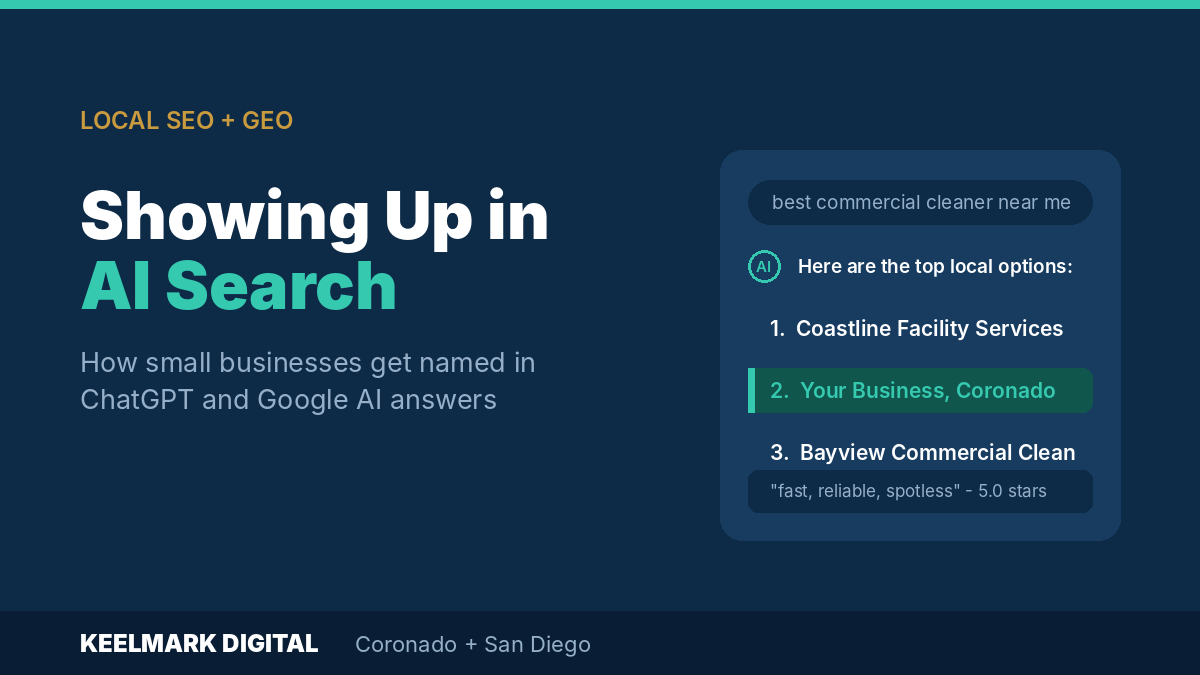
    Showing up in AI search - how small businesses get named in ChatGPT and Google AI answers

    Three things are worth understanding, without the jargon.

    Google now puts an AI Overview at the top of many searches, a few sentences that answer the question directly and name a handful of businesses. It is built from the same local signals Google already trusts, and it can even quote lines from your reviews. ChatGPT, Perplexity and the other assistants do something similar when someone asks for a recommendation: they pull from what they can find about you across the web and hand the user a short, confident answer. And because ChatGPT’s search leans on Microsoft’s index, your Bing listing suddenly matters as much as your Google one.

    The common thread is that these tools are not making things up about local businesses. They are repeating what the web already says about you, in the most consistent and credible version they can assemble. Your job is to make that version complete, accurate and easy to find.

    How to show up in AI answers

    Get your Google Business Profile right

    This is still the single biggest lever for local AI results, the same way it is for the map pack. Pick the most accurate primary category, fill in every service you offer, keep your hours and service area current, add real photos, and answer the questions people post. A thin or half-finished profile is the most common reason a business gets left out of the answer. We walk through the mechanics in How to Show Up in the Google Map Pack.

    Earn reviews, and reply to them

    AI answers lean on reviews heavily, and Google’s AI Overviews will even pull a specific sentence from one. A steady stream of recent, detailed reviews tells both the algorithm and the next customer that you are the real thing. Ask happy customers at the moment the work is done, make it a habit, and reply to every review, good or bad. Volume and recency both matter.

    Say the same thing everywhere

    An assistant trusts the version of you that is consistent across the web. Your name, address or service area, and phone number should match exactly on Google, Bing, Apple, Yelp, your website and the big directories. Mismatched or outdated listings make the AI unsure, and an unsure assistant leaves you out. This is the quiet, unglamorous work that decides a lot, and it is a core part of local SEO.

    Put the answers on your website in plain words

    The assistants can only repeat what they can read. If your site clearly states what you do, where you do it, and who you do it for, in plain sentences rather than vague taglines, you give them something to quote. Pages that answer real customer questions, with the service, the service area and the specifics spelled out, are the ones that get picked up. Clean, fast, well-structured pages help here too, which is one more reason site speed and Core Web Vitals are worth getting right.

    Be findable and consistent, not loud

    There is no ad to buy and no code to paste that forces you into an AI answer. You get there by being the clear, consistent, well-reviewed, easy-to-read choice across the places these tools look. That is earned over weeks, not bought in a day, which is good news for the business that does the work and bad news for the one hoping for a shortcut.

    A quick reality check

    You do not need to chase every new AI tool or obsess over which one is winning. They largely draw from the same well: your Google Business Profile, your reviews, your listings and your website. Get those four right and you are in good shape across all of them at once. Google has said as much in its own guidance on AI features and your website: there is no special markup that buys your way in, just solid, helpful, well-organized information.

    If you want to know where you stand today, the honest first step is to go ask. Open ChatGPT or Google and search the way a customer would, for what you do and where you do it, and see whether your name comes up. If it does not, that is not a verdict, it is a to-do list.

    One newer step worth taking now: ChatGPT lets you claim your business directly and control what it says about you. See our step-by-step walkthrough on how to claim your business on ChatGPT.

    Why work with a local, veteran-owned shop

    We are Keelmark Digital, a veteran-owned web design and management studio based in Coronado and serving businesses across San Diego. Getting found in AI search is a real part of what we do now: we dial in the Google Business Profile, line up the listings, build the reviews habit, and make the website say clearly what you want the assistants to repeat. If you are not sure whether AI is sending customers your way or sending them to someone else, that is worth a short conversation. Start a project and we will take an honest look at where you show up and where you do not, no pressure.

    Related reading: for the full picture, see our complete guide to Generative Engine Optimization (GEO) for small businesses.

  • Signs It’s Time to Redesign Your Small Business Website

    Signs It’s Time to Redesign Your Small Business Website

    Most small business owners think of a website redesign as a cosmetic thing. It looks dated, so it must be time for a refresh. But the signs that actually matter have little to do with looks. They are about whether your site is quietly costing you customers. If a few of these sound familiar, your site is overdue, and fixing it usually pays for itself. Several of them are also part of what Google calls page experience, the signals it weighs for both visitors and search ranking, so a redesign that addresses them helps on both fronts.

    It is slow, especially on a phone

    Overhead flat-lay of a website redesign in progress on a laptop and phone

    Speed is the first thing to check, because it is the one that loses you visitors before they ever see the page. If your site takes more than a few seconds to load on a phone on a cellular connection, a real share of people are already gone. You can test yours in about two minutes, and we walk through how in Website Speed and Core Web Vitals. If it fails on mobile, that alone is reason enough to rebuild.

    It does not work right on a phone

    Most of your visitors are on a phone. If they have to pinch and zoom, if buttons are hard to tap, or if the layout breaks and overlaps, they leave. A redesign that is built mobile-first fixes this, and it is not optional anymore. Your phone view is the main view now, not an afterthought.

    You cannot update it yourself

    If changing your hours, adding a service, or posting a photo means emailing a developer and waiting a week, the site goes stale, and a stale site quietly tells people you might not be around. A good rebuild hands you simple control over the things that change often and leaves the technical plumbing to someone who maintains it for you.

    It is not bringing in calls or leads

    Look at your home page and ask one question: what is the single most valuable thing a visitor can do here, and is it obvious in one tap? If the answer is buried three clicks deep, or there is no clear action at all, the site is a brochure, not a tool. A redesign built around one clear action, whether that is a call, a booking, or a quote request, is the fix. We go deeper on this in our Coronado web design guide.

    You do not show up when people search locally

    If someone nearby searches for what you do and you are nowhere to be found, the problem is often that your site and your listings are not telling the same story. A redesign is the natural moment to line up your pages, your Google Business Profile, and your local citations so they point at the same place in the same words. See Local SEO Explained and How to Show Up in the Google Map Pack for how that fits together.

    It looks like a different business than you are now

    If your site still lists services you dropped, photos from years ago, or a brand you have outgrown, it is working against you. First impressions online are fast and final, and an out-of-date site makes people wonder what else is out of date. When the website no longer matches the business, that is a clear signal.

    It is not secure, or it is breaking

    No padlock in the address bar (no HTTPS), plugins throwing errors, forms that do not send, pages that will not load. These are trust killers, and some of them quietly hurt your search ranking too. If your site is held together with tape, a rebuild is almost always cheaper than the slow bleed of lost visitors.

    What a redesign should actually fix

    A good redesign is not a new coat of paint. It makes the site fast, mobile-first, and easy for you to update, built around the one action you want visitors to take, and set up to get you found locally. If it does not move those needles, it is just a nicer-looking version of the same problem.

    What it costs and what to expect

    The honest range is wide, because a single-page refresh and a full rebuild with online booking and a dozen service pages are very different jobs. We laid out real numbers in How Much Does a Small Business Website Cost in San Diego? What should never vary is clarity: you should know what you are getting, what it costs, and who answers the phone when something needs changing.

    Why work with a local, veteran-owned shop

    We are Keelmark Digital, a veteran-owned web design and management studio based in Coronado and serving businesses across San Diego. We rebuild sites that are slow, stale, or just not bringing in the work, and we keep them running after launch. If a few of these signs hit home, that is worth a short conversation. Start a project and we will take an honest look at where your site stands, no pressure.

  • Web Design in Coronado: What Your Small Business Website Should Actually Do

    Web Design in Coronado: What Your Small Business Website Should Actually Do

    If you run a business in Coronado, your website is doing one of two things right now. It is either quietly bringing you customers, or it is quietly sending them to someone else. There is not much middle ground anymore. People check you out online before they ever call, walk in, or book, and the site they find in those thirty seconds decides a lot.

    Coronado is a small market with a particular kind of customer: residents who want to support local, plus a steady flow of visitors looking for somewhere to eat, stay, shop, or hire while they are on the island. A good small business website speaks to both, and it does it fast, on a phone, without making anyone think. Here is what that actually takes, in plain English.

    A website that works is built around one clear job

    Keelmark Digital web design in Coronado, a coastal small business workspace

    The most common mistake we see is a site that tries to say everything and ends up saying nothing. Before a single page gets designed, you should be able to answer one question: what is the single most valuable thing a visitor can do here? Call for a quote. Book a table. Request an estimate. Everything on the home page should push gently toward that one action, and it should be reachable in a tap from any screen.

    If you are still deciding whether a site is even worth it for your business, that is a fair question, and we wrote about it here: Do You Even Need a Website for Your Small Business in 2026? For most Coronado businesses the answer is yes, but the version of yes matters. A clean one-page site that loads instantly beats a sprawling ten-page site nobody finishes.

    It has to be found, not just built

    A beautiful site that no one sees is a brochure in a drawer. For a local business, being found means showing up when someone nearby searches for what you do, and that is a different skill than design. It comes down to a few things working together: your Google Business Profile, consistent local listings, and a website whose pages actually name what you do and where you do it.

    We go deep on the mechanics in Local SEO Explained and How to Show Up in the Google Map Pack, but the short version for a Coronado business is this: your website and your map listing have to tell the same story, in the same words, pointing at the same place. When they line up, you start showing up for the searches that bring in work.

    Fast and mobile, or it does not count

    Most of your visitors are on a phone, often on a cellular connection, often standing on Orange Avenue deciding where to go next. If your site takes four seconds to load, a real share of those people are already gone. Speed is not a nice to have, it is part of whether the site works at all, and Google uses it to decide who ranks.

    This is worth testing today. You can check any site for free with Google’s PageSpeed Insights tool, and we walk through what the scores actually mean in Website Speed and Core Web Vitals: A Small Business Guide. If your site fails on mobile, that is usually the first thing worth fixing, ahead of anything cosmetic.

    It should be easy to keep current

    A website is not a one time project, it is something you live with. Hours change, you add a service, you run a promotion, you want to post the photos from a job you are proud of. If updating any of that means emailing a developer and waiting a week, the site goes stale, and a stale site quietly tells people you might not be around. The right build hands you simple control over the things that change often, and leaves the technical plumbing to someone who maintains it for you.

    What it costs and what to expect

    Price is the question everyone has and few sites answer honestly, so we did: How Much Does a Small Business Website Cost in San Diego? The honest range is wide because the work is different for a single-location shop versus a business with online booking and a dozen service pages. What should never vary is clarity: you should know what you are getting, what it costs, and who answers the phone when something needs changing. If you want the full step by step of getting started, we laid it out in How to Start a Business Website.

    Why work with a local, veteran-owned shop

    We are Keelmark Digital, a veteran-owned web design and management studio based right here in Coronado, serving businesses across San Diego. Local matters more than it sounds. We know the market you are selling into, we are in your timezone, and when you need a change you are talking to the person who builds it, not a ticket queue three timezones away. We design the site, we get it found, and we keep it running, so you can get back to the work you actually do.

    If your current site is slow, hard to update, or just is not bringing in the calls it should, that is worth a conversation. Start a project and we will take a look at where you stand and what would move the needle, no pressure.

  • How to Show Up in the Google Map Pack (the Local 3-Pack)

    How to Show Up in the Google Map Pack (the Local 3-Pack)

    When you search for a local service, Google shows a small map with three businesses pinned at the top. That is the Map Pack, or local 3-pack, and those three spots collect most of the calls. Here is what actually decides who lands there, and how to improve your odds.

    What the Map Pack is

    How to show up in the Google Map Pack local 3-pack

    It is the block of three local businesses, with a map, that sits above the regular results for searches with local intent, think “plumber near me” or “office cleaning San Diego.” Ranking in those three spots is the single highest value thing most local businesses can do in search, and it is worth far more than drifting onto page two.

    The three things Google weighs

    • Relevance: how well your business matches what the person searched. Your primary category and the services on your profile drive this.
    • Distance: how close you are to the searcher. You cannot change your address, but you can define your service area.
    • Prominence: how well known and trusted you are, from reviews, links, citations, and your overall web presence.

    These three factors come straight from Google’s own local ranking guidelines, which are worth reading at the source.

    How to improve each one

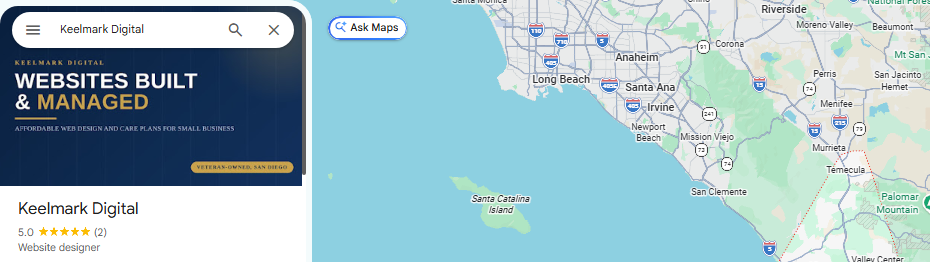
    Keelmark Digital Google Business Profile shown on Google Maps with a five star rating
    A complete Google Business Profile, like Keelmark’s own, is what earns a spot in the Map Pack: full name, correct category, service area, and real reviews.
    • Nail your categories. Pick the most accurate primary category, then add relevant secondary ones. This is the fastest win most businesses miss.
    • Complete the whole profile. Hours, services, photos, description, attributes. A complete profile outranks a thin one. Our five things to do after setup walks through it.
    • Earn reviews, and keep them coming. Volume, rating, and recency all feed prominence. Here is how to get more reviews the right way.
    • Fix your citations and NAP. Your name, address, and phone must match exactly everywhere online. See our guide to local citations.
    • Post and add photos regularly. Fresh activity signals an active, real business.
    • Make your website locally relevant. Clear city and service pages, fast load, mobile friendly.

    A realistic checklist

    If you do nothing else: claim and verify your profile, set the right primary category, fill the profile out completely, and build a steady habit of asking every customer for a review. Those four moves put most small businesses in the running for the 3-pack.

    Want help getting there?

    Keelmark sets up and manages all of this for local businesses, from the profile and categories to reviews and citations. If you are not in the Map Pack for the searches that matter, we can help you climb.

    Related reading: the same signals now power AI answers too. See how local businesses show up in AI search.

  • How to Get More Google Reviews (Without Breaking the Rules)

    How to Get More Google Reviews (Without Breaking the Rules)

    Online reviews are one of the biggest levers a local business has. They build trust with the person deciding whether to call you, and they help you rank higher in Google’s local results. The catch is that Google and Yelp both have firm rules about how you ask, and crossing the line can get your reviews filtered or your profile flagged. Here is how to earn more reviews the right way.

    Why reviews matter so much

    How to get more Google reviews the right way

    Two reasons. First, trust: most people read reviews before they call a local business, and a steady stream of recent, genuine reviews makes you the easy choice. Second, visibility: how many reviews you have, how good they are, and how recent they are all feed Google’s sense of how prominent and trusted your business is, which is one of the main things that decides who shows up in the local Map Pack.

    The rules you cannot break

    Before the tactics, the guardrails. Breaking these can get reviews removed or your profile penalized:

    • No review gating. You cannot ask only your happy customers, or screen people with a “was your experience good?” step and send only the satisfied ones to leave a review. You ask everyone the same way.
    • No incentives. You cannot offer a discount, a gift card, a raffle entry, or anything of value in exchange for a review.
    • No fake or self reviews. Nothing from your own staff, family, or anyone who was not a real customer.
    • Yelp is even stricter. Yelp discourages asking for reviews at all, and its software filters anything that looks solicited.

    How to earn more reviews, the right way

    The honest version is simple: ask everyone, make it effortless, and ask at the right moment.

    Following Google’s own rules keeps your reviews (and your profile) safe. You can read the full guidelines in Google’s prohibited and restricted content policy, which covers what is and is not allowed when you ask customers for a review.

    • Ask every customer, not just the ones you think are thrilled.
    • Make it one tap with a short link or a QR code that opens your review form directly.
    • Ask right after you have delivered, while the good experience is fresh.
    • Follow up once by text or email with the same link if they have not left one.
    • Train your team to ask in person. A human ask converts far better than a sign on the wall.

    Make it easy: your Google review link

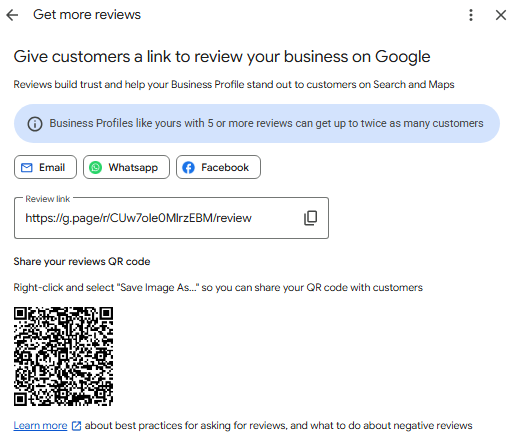
    Google gives every verified business a short review link. In the Google Business Profile app or on business.google.com, look for “Ask for reviews” or “Get more reviews” and copy the short link. Put it in your follow up texts and emails, on a card you hand out, and behind a QR code at the counter. The fewer taps between the customer and the form, the more reviews you get.

    Google Business Profile Get more reviews screen showing the review link and a QR code
    Google’s own “Get more reviews” screen inside your Business Profile. Copy the review link, or download the QR code, and share it with customers.

    Respond to every review

    Reply to all of them, good and bad. Thank the happy customers by name, and answer the critical ones calmly with a fix or a next step. Owners who respond look engaged and trustworthy, and never argue in public.

    Let us set up a compliant review flow

    At Keelmark we build a simple review request flow that asks every customer, routes them to your Google link, and keeps you fully inside the rules. If you want more reviews without the worry, we can set it up for you. It pairs well with keeping your Google Business Profile active with posts and photos and the rest of your local SEO, like keeping your business information consistent across the web.

  • Generative Engine Optimization (GEO): The Complete Small-Business Guide

    Generative Engine Optimization (GEO): The Complete Small-Business Guide

    More and more, your next customer is not typing a search into Google and scrolling through blue links. They are asking ChatGPT, Google’s AI Overviews, Gemini, or Perplexity a question like “who is the best web designer in San Diego?” and reading the single answer it gives back. Generative Engine Optimization, or GEO, is how you make sure your business is the answer they get.

    This is the plain-English guide to what GEO is, why it matters for a small business, and exactly what to do about it.

    Not sure GEO is worth it for your business yet? Start with our quick checklist: Does my business need GEO?

    What is Generative Engine Optimization (GEO)?

    Generative Engine Optimization connecting an AI assistant to a small business

    GEO is the practice of getting your business recommended and cited by AI answer engines: ChatGPT, Google AI Overviews, Gemini, Perplexity, Microsoft Copilot, and the growing list of tools people now ask instead of searching the old way.

    Traditional SEO is about ranking a page so a person clicks it. GEO is about being the business the AI names when it writes the answer, often before anyone clicks anything at all. The two are related, but they are not the same job.

    GEO vs SEO: what is the difference?

    SEO earns you a spot on the results page and a shot at the click. GEO earns you a mention inside the answer the AI gives, where there may be no results page to scroll at all. Good news: the two overlap a lot. The same things that make you trustworthy to Google, clear content, a strong profile, consistent business information, and real reviews, are what make an AI confident enough to recommend you. You are not throwing out your SEO. You are extending it.

    Why GEO matters for small businesses

    For years the game was ranking on page one. Now a large and growing share of searches end with an AI answer the person never clicks past. If the AI does not know your business, or is not sure it can trust the information about you, it recommends someone else, and you never even get the chance at the click.

    The flip side is the opportunity. GEO is still new, which means most of your local competitors are not doing it yet. A small business that gets this right now can become the answer in its category while everyone else is still thinking about it.

    How AI engines decide who to recommend

    AI answer engines are not ranking pages the way Google’s ten blue links did. They are assembling an answer from what they can find and trust about you across the whole web. A few things drive whether they pick you.

    Clarity about who you are. The AI needs to understand, without guessing, what you do, where you serve, and what makes you a fit. Vague or inconsistent information gets left out of the answer.

    Consistent information everywhere. If your name, services, and service area are described the same way across your website, your Google Business Profile, and the directories you are listed in, the AI trusts that picture. If they conflict, it hedges, and hedging means it names someone else.

    Third-party validation. AI models lean heavily on what other sources say about you, not just your own website. Being mentioned, reviewed, and listed on trusted third-party sites tells the model you are real and recommendable.

    Real reviews. Reviews are both a trust signal and a source of the language the AI uses to describe you. They matter for GEO the same way they matter for the map pack.

    Content that answers questions directly. Clear, factual writing that answers a real question in a few sentences is exactly what an AI can lift into an answer. Fluffy, buried, or salesy content is not.

    How to do GEO: the practical steps

    1. Make what you do unmistakable. State clearly, on your own site, what you do, who you serve, and where. One consistent description, repeated across every place you appear.

    2. Keep your business information identical everywhere. Your name, phone, service area, and category should match across your website, your Google Business Profile, and every directory. Inconsistency is the single biggest thing that makes an AI unsure about you.

    3. Earn third-party mentions. Get listed in the directories that matter, earn reviews, and look for chances to be mentioned on local and industry sites. AI models trust a business the rest of the web agrees exists and does good work.

    4. Add structured data (schema). Organization, LocalBusiness, and FAQ schema help both search engines and AI understand your facts without guessing. This is a quiet, technical win that pays off.

    5. Write in a question-and-answer shape. People ask AI full questions. Content built around real questions, with a clear answer right up top, is far easier for an AI to use. A good FAQ section is GEO gold.

    6. Keep it current. Fresh, accurate, dated content signals that your information can be trusted today, not two years ago.

    Do you still need regular SEO?

    Yes. SEO and GEO feed each other. The pages, profiles, reviews, and citations that help you rank are the same sources AI engines read to decide who to recommend. Think of GEO as the next layer on top of a solid local SEO foundation, not a replacement for it.

    Does your business actually need GEO?

    Short version: if your customers could plausibly ask an AI “who should I hire for this?”, then yes. The businesses that start now, while the space is wide open, get a real head start on becoming the answer in their category. If you want a quick read on where you stand, we are happy to take a look for free.

    GEO and local search go together

    If you serve a local area, there is a specific and powerful version of this: getting your business named when someone asks an AI for the best option near them. It runs on the same engine as the Google Map Pack. We break it down in our guide on how local businesses show up in AI search, and you can see how it ties into your Google Business Profile and our full set of services.

    Frequently asked questions

    What does GEO stand for?

    Generative Engine Optimization: optimizing so AI answer engines like ChatGPT, Google AI Overviews, Gemini, and Perplexity recommend and cite your business.

    Is GEO different from SEO?

    Yes, but they overlap. SEO earns you a ranking and a click; GEO earns you a mention inside the AI’s answer. The same trust signals power both.

    How long does GEO take to work?

    Like SEO, it builds over time as your information becomes consistent and trusted across the web. The businesses that start now get a head start while the space is still wide open.

    Can a small business do GEO?

    Absolutely, and small businesses have an edge right now because most competitors have not started. Clear information, consistent listings, real reviews, and question-shaped content go a long way.

    Want to know whether AI search already mentions your business, and where you stand? We will take a look, for free, no pressure. Start here.