Online reviews are one of the biggest levers a local business has. They build trust with the person deciding whether to call you, and they help you rank higher in Google’s local results. The catch is that Google and Yelp both have firm rules about how you ask, and crossing the line can get your reviews filtered or your profile flagged. Here is how to earn more reviews the right way.
Why reviews matter so much
Two reasons. First, trust: most people read reviews before they call a local business, and a steady stream of recent, genuine reviews makes you the easy choice. Second, visibility: how many reviews you have, how good they are, and how recent they are all feed Google’s sense of how prominent and trusted your business is, which is one of the main things that decides who shows up in the local Map Pack.
The rules you cannot break
Before the tactics, the guardrails. Breaking these can get reviews removed or your profile penalized:
- No review gating. You cannot ask only your happy customers, or screen people with a “was your experience good?” step and send only the satisfied ones to leave a review. You ask everyone the same way.
- No incentives. You cannot offer a discount, a gift card, a raffle entry, or anything of value in exchange for a review.
- No fake or self reviews. Nothing from your own staff, family, or anyone who was not a real customer.
- Yelp is even stricter. Yelp discourages asking for reviews at all, and its software filters anything that looks solicited.
How to earn more reviews, the right way
The honest version is simple: ask everyone, make it effortless, and ask at the right moment.
Following Google’s own rules keeps your reviews (and your profile) safe. You can read the full guidelines in Google’s prohibited and restricted content policy, which covers what is and is not allowed when you ask customers for a review.
- Ask every customer, not just the ones you think are thrilled.
- Make it one tap with a short link or a QR code that opens your review form directly.
- Ask right after you have delivered, while the good experience is fresh.
- Follow up once by text or email with the same link if they have not left one.
- Train your team to ask in person. A human ask converts far better than a sign on the wall.
Make it easy: your Google review link
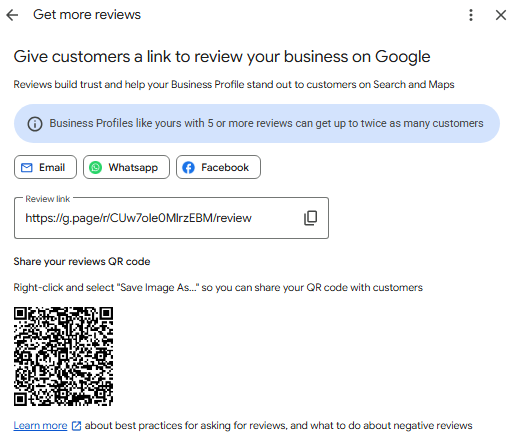
Google gives every verified business a short review link. In the Google Business Profile app or on business.google.com, look for “Ask for reviews” or “Get more reviews” and copy the short link. Put it in your follow up texts and emails, on a card you hand out, and behind a QR code at the counter. The fewer taps between the customer and the form, the more reviews you get.
Respond to every review
Reply to all of them, good and bad. Thank the happy customers by name, and answer the critical ones calmly with a fix or a next step. Owners who respond look engaged and trustworthy, and never argue in public.
Let us set up a compliant review flow
At Keelmark we build a simple review request flow that asks every customer, routes them to your Google link, and keeps you fully inside the rules. If you want more reviews without the worry, we can set it up for you. It pairs well with keeping your Google Business Profile active with posts and photos and the rest of your local SEO.
